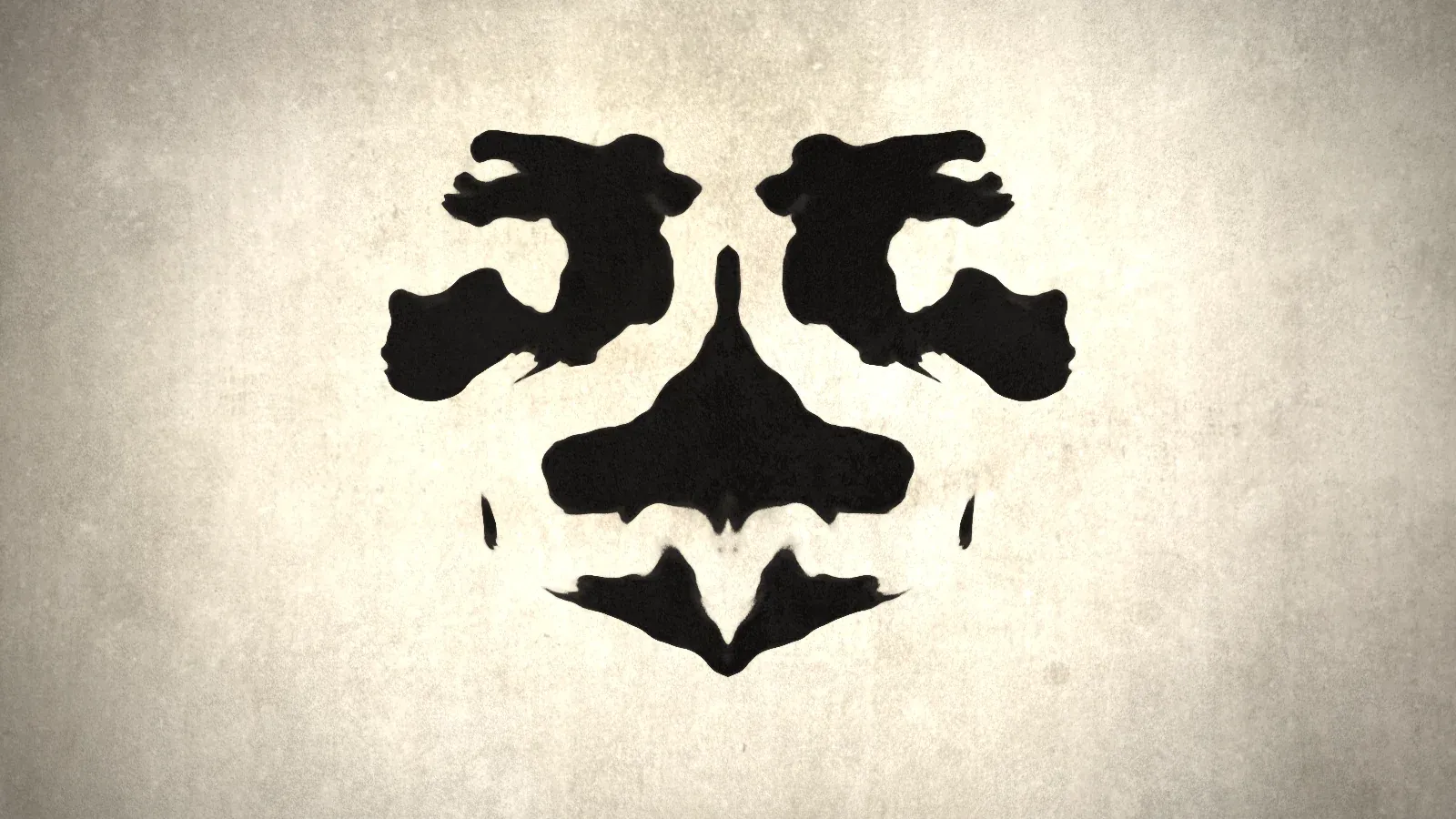
View online: editor.p5js.org/desholmes/full/KkA95pyNv
Source: github.com/desholmes/rorschach-mask-effect-using-p5js | Licence: MIT
👀 It never shows the same blot twice: every page load starts from a new random seed, and the ink keeps moving for as long as you watch.
The inspiration
In Watchmen, Zack Snyder’s 2009 film of the Alan Moore and Dave Gibbons comic, Rorschach wears a white mask covered in black ink blots. The blots never stop moving. They spread, split and join again, and they always stay symmetrical, like a Rorschach test card that won’t settle.
I wanted to recreate that effect in code. My brief was short:
- black ink on an off-white, stained fabric surface;
- mirrored left to right, like a real ink blot folded in half;
- continuous, slow movement, with no clicks or key presses needed;
- something I could share as a sketch in the p5.js editor.
I left out the face, the hat and the dark city backdrop on purpose. The ink is the interesting part.
One shader, no particles
My first thought was to simulate ink: drop particles, let them spread and mirror the result. That gets slow quickly, and it’s hard to keep the ink moving forever without it all running together.
Instead, the whole effect lives in one fragment shader, rorschach.frag. p5.js draws a single rectangle that fills the window, and the shader works out the colour of every pixel, every frame. For each pixel it:
- mirrors the coordinates around the vertical centre line, the “fold”;
- samples a 3D noise field, with time as the third axis, so the shapes drift;
- warps that noise with more noise, which turns plain blobs into ink-like tendrils;
- fades the ink out towards the edges, so the blots gather around the centre;
- decides whether the pixel is ink or fabric, and how wet the ink looks.
The fold is one line. Taking the absolute value of x means both halves of the canvas read exactly the same noise:
// The Rorschach fold: mirror left onto right
vec2 m = vec2(abs(p.x), p.y);

// Domain-warped noise field that drifts through time
vec2 s = m / uShapeScale;
vec3 q = vec3(s * 2.2, uTime);
vec2 warp = vec2(
  fbm(q + vec3(uSeed, 0.0, 0.0)),
  fbm(q + vec3(5.2, uSeed + 1.3, 0.0))
);
float n = fbm(vec3(s * 2.6 + warp * 1.1, uTime * 0.7 + uSeed * 0.37));
fbm is fractal noise: several layers of simplex noise at increasing detail, added together. Feeding one noise field into the coordinates of another is called domain warping. It’s what gives the blots their stretched, poured look instead of round blobs.
Making it look like ink
The first version worked, but it looked like a graphic, not like ink. Getting it closer took three rounds of changes.
Cleaner edges
The edges were grainy. I’d used a concrete texture to roughen them, and its fine grain scattered speckles and tiny islands all along the outline. I swapped it for smooth noise that wobbles the edge gently, and kept the texture for the fabric only. The wobble uses the unmirrored coordinates, so the two halves are never quite identical. A real ink blot never prints perfectly either.
Ink that soaks in
Painting flat black over the fabric made the ink look stuck on. Three changes helped it blend in:
- the ink is multiplied onto the fabric, so stains and fibres show faintly through it;
- each blot has a slightly lighter wet rim that builds to a solid core;
- a faint, patchy shadow sits just outside each edge, like ink wicking into the fibres.
Bigger, bolder shapes
The blots were too detailed: lots of small filigree, and not enough bold shapes. I added two settings, one for the size of the shapes and one for how much fine detail they carry. Bigger shapes caused two side effects that needed fixing:
- the edges went soft, because the noise changes more slowly across the screen. The shader now rescales the field, so the edge stays the same width at any size;
- the amount of ink swung from a heavy blot to an almost empty screen, because fewer, larger shapes fit in the frame. A stronger pull towards the centre keeps every seed looking like a full blot.
Tuning it
Every setting that changes the look sits at the top of main.ts:
const DRIFT_SPEED = 0.05;     // how fast the ink morphs
const INK_AMOUNT = 0.3;       // overall ink coverage
const SHAPE_SCALE = 1.7;      // higher means larger, bolder blots
const DETAIL = 0.38;          // 0 to 1: lower means smoother, simpler blots
const EDGE_SOFTNESS = 0.009;  // lower means crisper edges
const MAX_PIXEL_DENSITY = 2;  // lower it if the frame rate drops
The sketch renders at the screen’s native resolution, up to 2x, so the ink edges stay smooth on high-DPI screens. That means the shader runs around four times as many pixels on a Retina display, so MAX_PIXEL_DENSITY is the first thing to lower on a slower machine.
The build
The project is written in TypeScript and runs on Vite, with p5.js 2 in instance mode and Biome for linting and formatting. Dependencies are pinned to exact versions, installed through Socket Firewall, and npm ignores releases less than three days old.
The p5.js editor is a different world: no bundler, no npm and no TypeScript, just an index.html, a sketch.js and any files you upload. So a second build, npm run build:editor, turns the project into exactly that:
index.htmlloads p5.js from a CDN, at the same version as the lockfile;sketch.jsis plain, readable JavaScript with the shaders inlined as strings;- the textures are copied out, ready to upload.
Getting it running in the editor turned up two gotchas worth knowing about.
ReferenceError: _LP0 is not defined. The editor rewrites every loop in your sketch to protect against infinite loops. The bundler had added a small helper with a loop written as if (...) for (...), with no braces, and the rewrite can’t handle that form. The editor build now maps p5 straight to the global window.p5, so the helper, and its loop, disappear.
“There was a problem loading your file”. The editor doesn’t serve uploaded files at their normal paths. It looks for quoted file paths in sketch.js and swaps in their hosted URLs. My code built the texture path from two parts, so there was no complete path for it to find. Writing each path as one string, "textures/grunge.jpg", fixed it.
Using it
To run it locally:
git clone https://github.com/desholmes/rorschach-mask-effect-using-p5js.git
cd rorschach-mask-effect-using-p5js
nvm use
npm run ci
npm start
Then open localhost:5173.
Credits
The 3D simplex noise in the shader comes from webgl-noise by Ashima Arts and Stefan Gustavson, under the MIT licence 🙌
The code is free to use and modify under the MIT licence. Watchmen and all related characters and elements are trademarks of and © DC Comics. The film is © 2009 Warner Bros. Entertainment Inc., Paramount Pictures Corporation and Legendary Pictures. This project is an independent tribute and isn’t affiliated with or endorsed by any of them.